Have you ever wished to transform your ideas into profit? Publishing and selling books on Amazon Kindle allows you to easily share your writing with a global audience — and earn money from it.
There are many ebooks generating millions of dollars each month, and there are creators achieving financial independence by selling books on Amazon Kindle. Nowadays, creating an ebook is quite simple.
I will guide you on how to develop a high-demand ebook by conducting effective keyword research for Amazon KDP. After that, we will explore methods to market the ebook using both organic strategies (without spending on ads) and inorganic strategies (through paid advertising) to boost our sales on Amazon KDP.
Additionally, I will utilize two paid keyword research tools to identify the most effective keywords for our ebook. We will thoroughly examine the features of these tools and learn how, as a beginner, you can leverage them to discover the best and quickest-selling ebook concepts. The best part about selling books on Kindle is that you don’t need to be a tech expert to start.
Let’s start without wasting a minute!
What is Amazon KDP?
Amazon KDP (Kindle Direct Publishing) provides a self-publishing service that lets authors, entrepreneurs, and content creators publish their books and sell them worldwide on Amazon. This encourages people from all over the globe to enter the online space, turn their ideas into profitable ventures, and share them with the world.
It provides you with numerous choices; you can submit an ebook, paperback, or hardcover, and for every sale, you will receive royalties of up to 70%. Managing your earnings information is straightforward and trouble-free. You can access your account to manage your ebook store. Here, you can track your published ebooks.
Types of Amazon KDP books
How does Amazon KDP work?
Many individuals like us upload their ebooks, paperbacks, and hardcovers on the KDP platform. After that, people buy these products according to their respective needs and interests. The amount paid by the customers is divided into halves; one goes to the owners of the ebook, known as royalties, and the other half goes to Amazon. This is how the Amazon KDP model works.
How do I create an Amazon KDP account?
It is very simple to create an account on Amazon KDP. Just follow these simple steps:
- Go to Amazon KDP.
- Click on Join KDP.
- Enter your name, Email, and password.
- Click on Create Account.
- After that, enter the security code sent to your email.
Your KDP account has been successfully created.
How to earn money by selling ebooks on Amazon Kindle?
This is the core part of this article, and you will undoubtedly get profit from KDP if you attentively follow every step. Beginners frequently fear it’s difficult, but once you know the methods, selling books on Amazon Kindle is easy.
After creating an account, you need to start building your product.
“The better the product, the more chances of its becoming a top seller”. So, it depends on the product, whether it will be easy or hard for you to sell books online on Amazon.
Frankly, it is not that hard to find your best seller. You need a great potential keyword that is underperforming, then create an ebook on it with a persuading cover, eye-catching title, subtitle, and a less pricky template. If you have all these combinations, then definitely your ebook is going to become a best seller.
So, now you need to start your keyword research, and we will try to find the best keywords for our ebook.
What is the best keyword for Amazon KDP?
A keyword is known as the best keyword when it has all the following things.
- It has great potential.
- The search difficulty is low.
How to find the best keywords for your ebook?
To find the best keywords for your ebook, you need a keyword research tool, and I will use two of the best keyword research tools for our keyword research. The first one is Sellersprite, and the second one is Bookbolt. Both of these are paid tools and very easy to use, and even a beginner with very little knowledge can also find great keywords that can generate a lot of sales. Let’s start and learn how to do keyword research.
What is Sellersprite?
SellerSprite is a tool for market research and product analytics that is designed for Amazon sellers. It helps entrepreneurs find profitable products, understand market trends, and improve listings to increase sales. With SellerSprite, you can explore keywords, discover popular products with low competition, and track price or sales trends across various Amazon marketplaces around the world.
It also enables you to monitor competitors’ rankings, reviews, and stock levels, while providing data-backed advice for titles, bullet points, and descriptions. Comparable to tools such as Helium 10 and Jungle Scout, SellerSprite aims to streamline product selection, enhance SEO, and facilitate smarter business decisions for anyone selling books on Amazon Kindle.
You can get this tool at a very low price, which is $79/ month. But if you use coupon codes, you can get it for an even cheaper price. The coupon codes are available on Google.
I know it is a bit expensive, but if you really want to earn, then you should definitely invest some money. One thing that I can suggest to you is to buy this tool for a month and then do keyword research in advance for a year. This way you can save a lot of money.
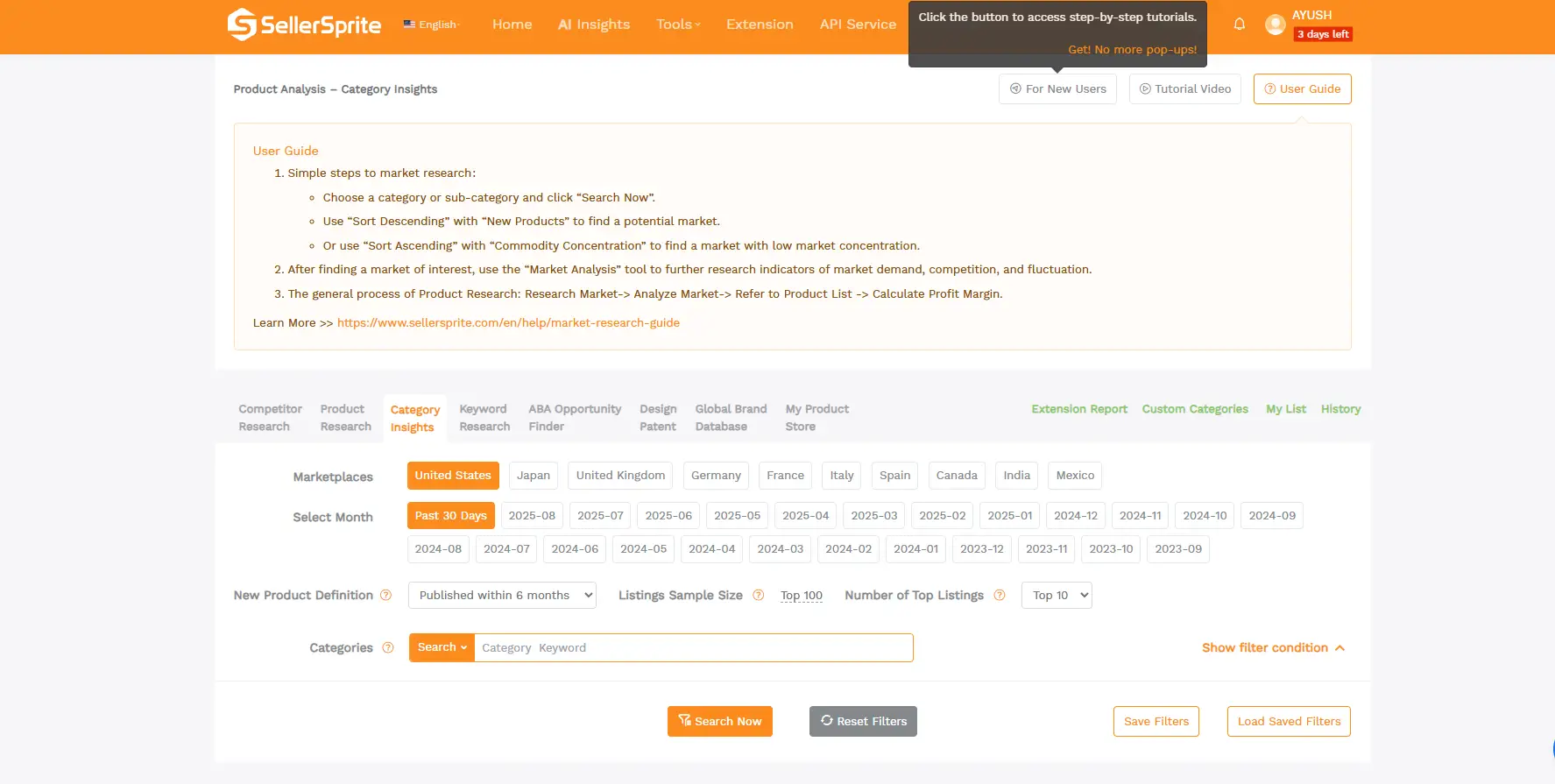
Features of Sellersprite:
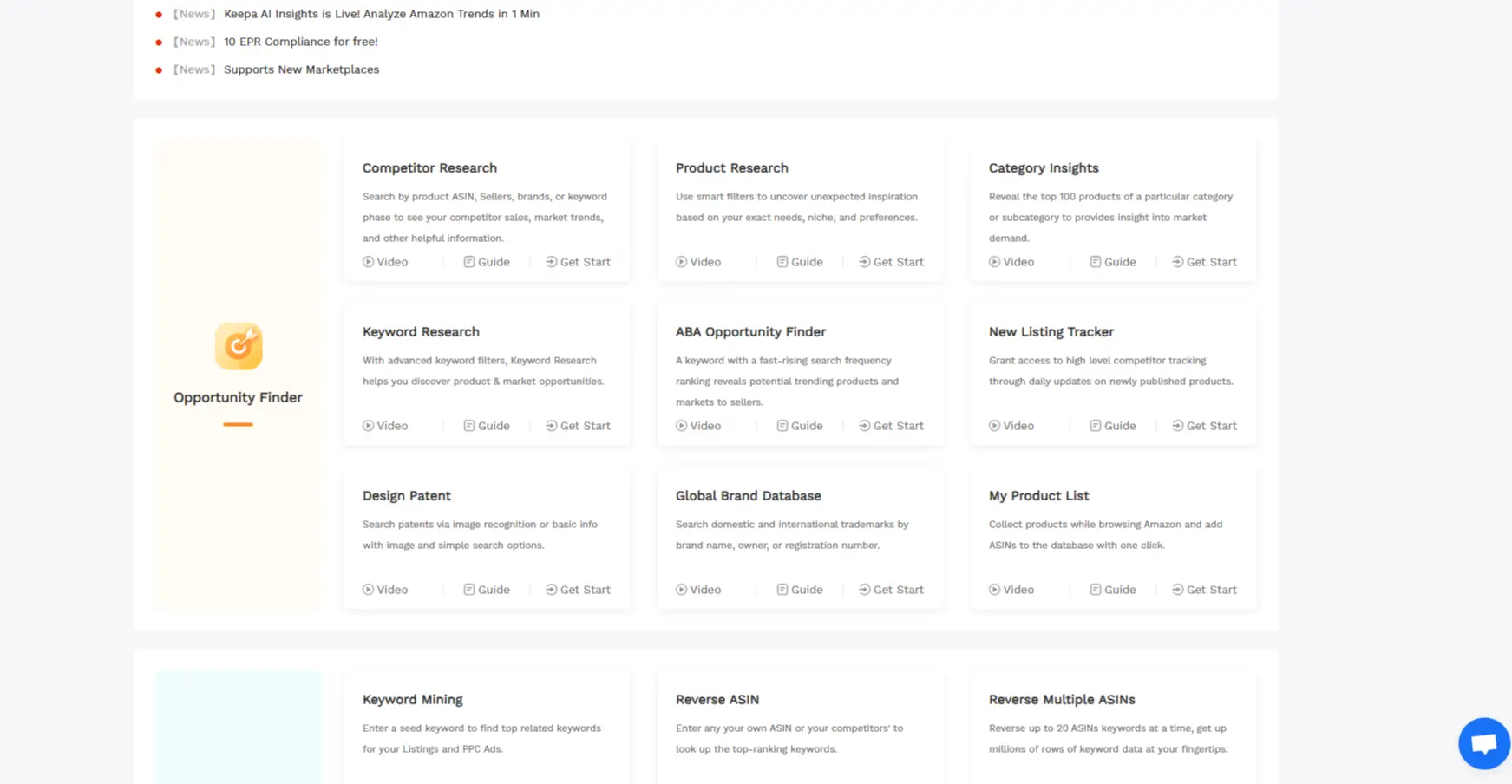
There are a lot of features, and you should know how it works, then only you will be able to do great keyword research. These are some features:
- Product Research: In this option, you can research about any product. This option shows the statistical data of that product, and also shows how the product has performed in the last 30 days in a specific country. It also provides a lot of filter options that will enhance your keyword research, resulting in a great output.
- Competitors: This will help you track your competitors, and correctly using this option can become a game-changer for you. By using this option, you can understand which product is performing best in the market. According to that, you can choose the product that will have a high chance of becoming successful.
- Market Research: This will help you to understand what is trending in the market currently, and will help you to work accordingly. It also has a Chrome extension that can be used for market research.
- ABA (American Booksellers Association): These are terms that people often search for before buying, which is very important because it gives you an understanding of what terms have a high chance of converting potential buyers into guaranteed buyers. It also has a lot of filter options, which will help its users with in-depth research for their product.
How to use Sellersprite for keyword research?
After getting familiar with all the features of this website, we will look for a product that we are going to replicate. Let’s see how to do it.
- Go to the Competitor lookup.
- Go to filters and adjust them accordingly. If you want a complete, detailed video, you can learn from the tutorials as well.
- Look for a product that is a best seller in Q4.
- Try to go for a product that is not more than 6 months old.
- After finding a product, according to your interest.
- Check how the product has performed in Q4.
- Select the product.
Pro Tip: We focus on Quarter 4 (Q4) since this is when people spend the most money during the festive seasons.
After choosing the product, you have to replicate it. But before that, let’s also learn how to do keyword research with BookBolt.
What is Bookbolt?
BookBolt is a web-based service that assists creators in designing, researching, and publishing low- or no-content books on Amazon KDP. It provides pre-made templates for various items like journals, planners, and notebooks, in addition to a drag-and-drop feature for personalized interiors and covers.
With tools for keyword research, listing enhancement, and market evaluation, BookBolt simplifies the process for both newcomers and experienced users to produce professional books, identify lucrative niches, and ease the process of selling books on Kindle. Thus, resulting in increased sales.
It is also a paid tool and can turn out very effective for you if used in the right way. It is available for $10/month, and yearly plans are a lot cheaper. We can do the same thing, buy it for a month, then do advanced keyword research for a year or so. Now, you have content ideas for a year, just by buying it for a year.
Features of Bookbolt:
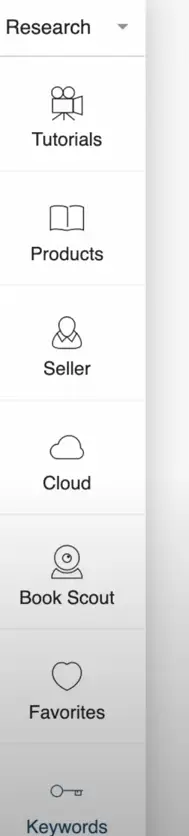
It is very easy to use, and the features are quite user-friendly. There are a lot of options present on the Research page. The features present on the homepage are:
Tutorials: You can watch videos and learn how to use these features.
Product Research: This will help you to do an in-depth research of any product.
Seller: By using this, you can get knowledge about the seller of the product.
Cloud: It allows you to do research category-wise. Once you have selected a category, it will show you a list of books and their performance.
Keyword research: You can use this for specific keyword research. If you have a keyword in mind, enter it here. It will show you that keyword’s performance and suggest related keywords that you can use.
How to use Bookbolt for keyword research?
We will try to find the best keywords that have high potential and low competition. For that, we need to find a keyword, and if you do not have any keywords in mind, then randomly enter a category or a type of book that you are interested in creating. For example, puzzle books, journals, recipes, etc., we will use three features for that: Product Research, Cloud Research, and Keyword Research.
Firstly, we will use the Product research tool.
How to use the Product Research Feature?
- Go to Product research.
- Enter your desired keyword.
- Select Category as general.
- A lot of products with their sales performance will pop up, and it also shows the trending products.
- It also shows some related terms.
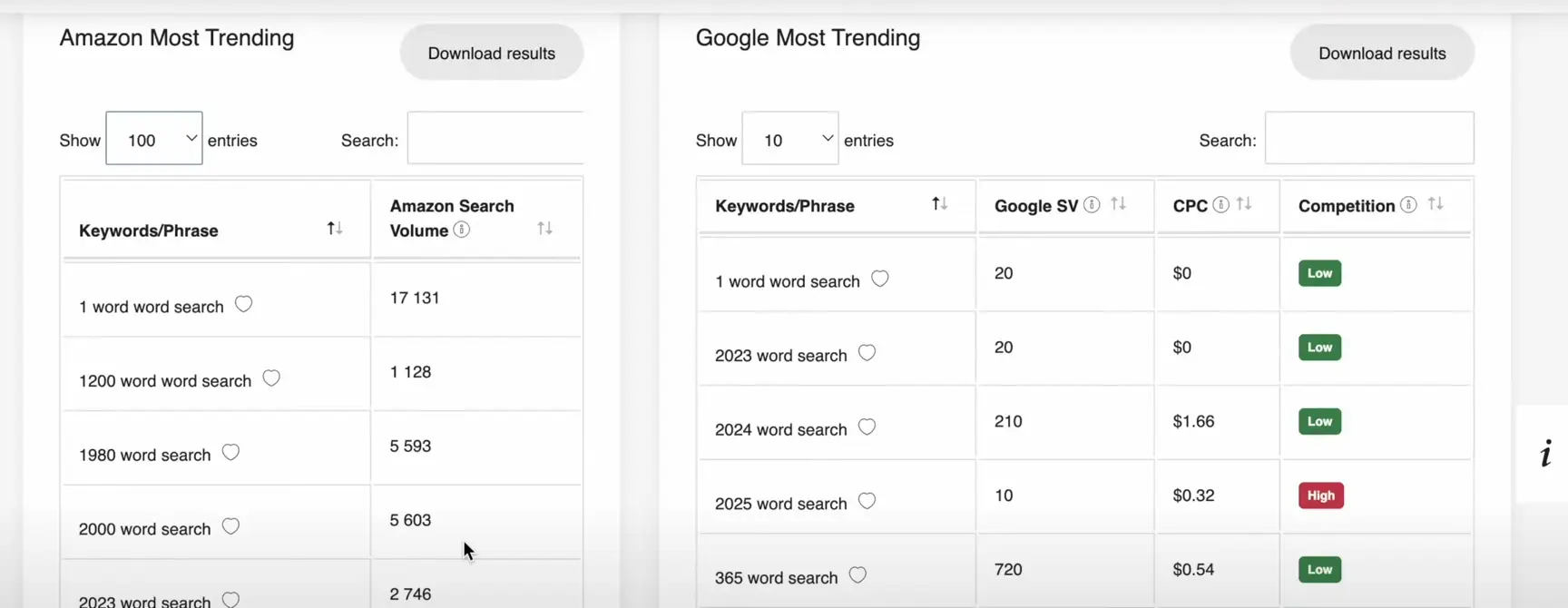
This data will help you find the best product for you. After that, we will use the cloud research tool for in-depth research of our product and to find some more keywords.
How to use Cloud Feature?
- Go to Cloud.
- Enter a Category.
- You will be able to see a lot of books with their description and the amount of sales they are generating.
- Choose one or two products.
- After that, go to Amazon and search for the products.
- We will look for a product that has search results under 500, because that is very important for us.
After that, we will use the Keyword research tool.
How to use the Keyword Research Feature?
- After selecting your 2-3 keywords.
- Go to the keyword option.
- Enter your keyword.
- The result shown to you should have a Competition score of A, as shown in the image below.
- It means that we can use that keyword.
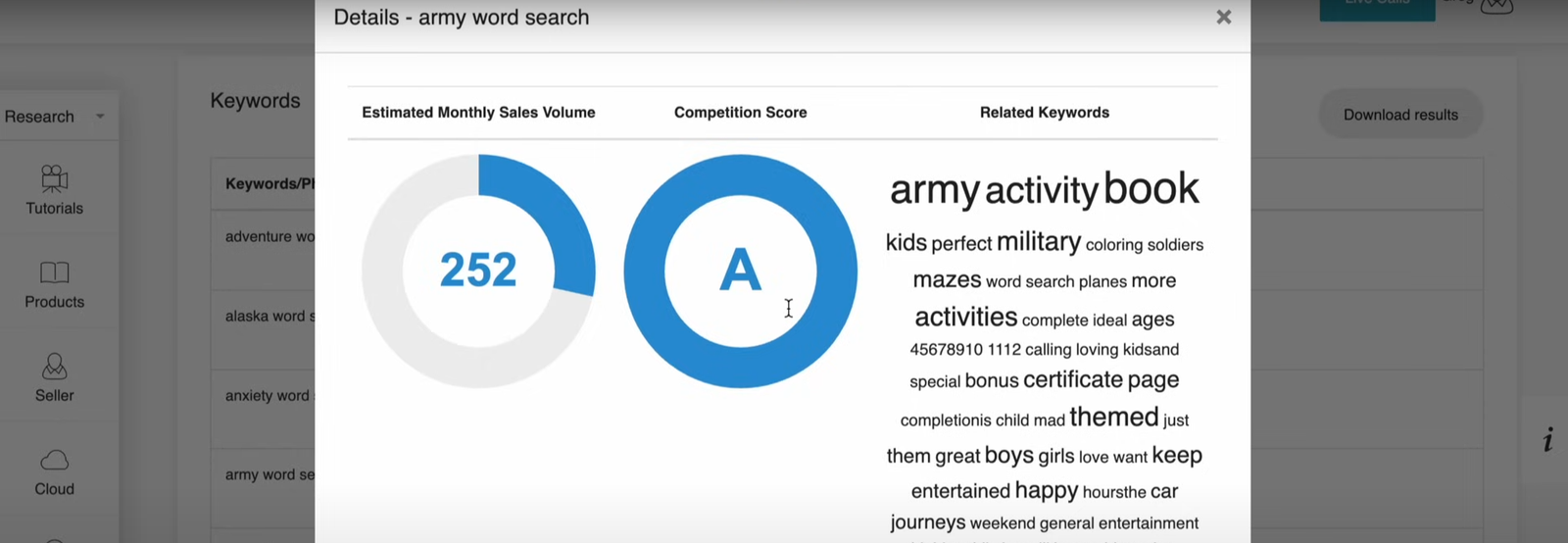
PRO TIP: Always choose keywords that are A-rated.
We need to create an ebook first to start selling books on Kindle.
How to create an ebook?
The ebook creation process is very simple. We need some basic information, like the dimensions of our manuscript, and keep in mind that to sell books online on Amazon successfully, think of your cover, title & subtitle as your primary marketing tools. The last and main thing is the content, which you can either write yourself or get from ChatGPT. We will use the Bookow tool for book formatting and Canva for designing and finalising the ebook.
We’ll need an ebook for reference that we are going to replicate. You can select any of the ebooks from the top sellers.
How to use Bookow for ebook formatting?
Copy the dimensions and the number of pages of the ebook that we are using for reference.
- Now, go to Bookow.
- Go to the KDP cover template generator.
- Now, paste the dimensions( Ex, 6*0.28*9).
- Please enter your email, and choose to download it for free.
- Download it from your email.
Now, we will use Canva to design our e-book.
How to create an ebook using Canva?
We will need Canva Premium software to create our customized-sized ebook. So, make sure to buy it; otherwise, it is not possible. Keep in mind, we need to meet the requirements to comply with Amazon KDP, or else they can even reject your ebook.
We will create our ebook step by step. The first step is to create the paperback.
Create a Book Structure
- Go to Canva.
- Click on create Custom size.
- Enter your ebook width and height (Ex, 12.493*9.25 inches).
- Drag & Drop the cover template that you have downloaded from Bookow.
- Create margins for your ebook.
- Delete the PDF, and now you have to create your ebook in the required size mentioned in the PDF.
Create a cover for your book
- You can choose any template from Canva or create your own.
- After selecting a template, design it with simple colors and stickers.
- Add an eye-catching Title and Subtitle.
- Now, your ebook cover is ready.
PRO TIP: Cover design plays a big role because, in selling books on Kindle, first impressions matter to readers.
Create content for your ebook.
- You can use ChatGPT or any other AI tools for generating your content.
- There are a lot of prompts that you can use for creating your content.
- You should definitely use your own creativity to give your ebook a fresh and new flavour.
- After creating your content, it’s time to paste your content into your ebook.
Create a Pages template for your book
- Again, on Canva.
- Click on create Custom size.
- Enter your ebook width and height (Ex, 6*9 inches).
- Create the required number of pages.
- Now, we have to design them because we will paste our content here.
- We can take help from YouTube or Pinterest as well.
Finalise your book
- Paste your content in each of your pages.
- Select easy-to-read fonts.
- Don’t put too many things in your ebook because it should have high readability.
Your ebook is ready. Go download it, and then download your ebook cover and all pages in PDF.
How to publish books on Kindle?
The easiest way to reach a worldwide audience is to sell books online on Amazon. Now, are you excited to publish your first ebook!!
Enter Paperback details
- Go to Amazon KDP.
- Click on Create paperback.
- Fill all book-related details: title, subtitle, Author name, and description of your ebook ( You can use ChatGPT for your ebook description).
- Click on ” I owe” Copyright.
- Click on no to the primary audience.
- Add Categories.
- Click on the low-content book.
- Add keywords for your ebook.
- Click on save and continue.
Enter Paperback Content
- Click on publish without an ISBN.
- Choose Black & White interior with white paper
- Enter Size
- Upload your Manuscript
- Upload your Cover file
- Click on No to AI-generated content.
- Launch the previewer to see your ebook.
- Click on approve if you don’t find any issues in your ebook.
PRO TIP: Before you can sell books online on Amazon, you need to prepare a clean, properly formatted manuscript.
Enter Paperback pricing
- You will be able to see the printing cost of your ebook.
- Click on save & continue
- Set your ebook pricing. Don’t set it too high; otherwise, it will negatively impact your sales.
- We can also see how much royalty we can earn.
- Now, click on Publish your Paperback.
- Within 72 hours, you will receive an email that your book is now on Amazon marketplaces.
PRO TIP: Pricing is a very crucial aspect; So your price should meet the expectations of your audience, then only selling books on Amazon Kindle is successful.
How to Publish Ebooks on Kindle?
One of the most common questions new authors ask is how to publish books on Kindle. The process is the same as Paperback publishing; you can follow all the steps that I have mentioned for Paperback publishing, and you will easily be able to publish an ebook.
How to sell books in Amazon KDP?
Once you understand how to sell books in Amazon KDP, you can turn your ideas into income.
The main thing for which we are doing all this hard work is for money. So, after publishing your book, we need it to generate sales. For that, we will do marketing for our product to let people know about it, and that will increase the chances of our selling books on Amazon Kindle. We will use two methods of marketing: The first one is going to be Paid Marketing, and the second one is going to be Organic Marketing.
PRO TIP: 1) If you want to master how to sell books in Amazon KDP, focus on building reviews early to improve visibility.
2) Analytics play a role too; understanding how to sell books in Amazon KDP means regularly checking your sales dashboard.
How to use Paid Marketing for selling books on Kindle?
For paid marketing, we will use Amazon.
- Go to Marketing.
- Find Amazon ads and select amazon.com.
- Click on start advertising
Now you need to create a campaign to run ads for your ebook.
How to create a campaign to sell books online on Amazon?
- Go to the campaign manager.
- Click on Create campaign.
- Choose your Campaign Type> Sponsored Products.
- Add your product for which you want to run ads.
- Click on Manual Targeting> Keyword Targeting.
- Set the filter to phrase and exact match.
- Enter your keyword with a low CPC.
- Now adjust your keywords bid to the lowest and remove keywords that have a CPC of more than $1.
- Add negative keywords( Use ChatGPT).
- Enter a Custom text.
- Select Dynamic bids( down only).
- Set your daily budget.
- Here’s how to do it. Click on Launch Campaign, and your campaign will be live in 24 hours.
Pro Tip: Use seller sprite and see which product is ranking in your category. Extract keywords out of it. But keep in mind the keyword should have a low CPC; otherwise, your budget will be finished very soon.
How to use Organic Marketing for selling books on Amazon Kindle?
For organic marketing, we will use several social media platforms to market our book. I have a few ideas for organic marketing.
- Create a Pin Post for Pinterest.
- Write a blog post about your book and then share the buying link.
- Go to Quora, create a question related to your book, and then answer it. At the end of your answer, internally link your book’s buying link.
- You can also create reels for your book, and if you need an idea for your reel, use ChatGPT. I have given a lot of prompts in my previous article, and you can visit there for the prompts. If you do not want to show your face, you can use AI for that.
Pro Tip: Keep creating pins, blog posts, Q&A answering, and create as many reels as you can for the promotion of your book.
Common FAQs
How to earn money by selling ebooks?
Follow these steps to make money selling books on Kindle.
- Use keyword research tools to find a low-competitive niche with great potential.
- Create content using ChatGPT and other AI tools.
- Try to replicate the best seller of your niche, but obviously be unique to stand out.
- Use Canva for designing the cover and content of your ebook.
- Publish it on Amazon KDP.
- Run paid ads to generate sales.
What’s the secret to choosing the right price for your Kindle book?
It is a very small focus, but one of the most important things about your book. The right price for a book differs from one niche to another. Follow these steps to find the best price for your book.
- Don’t make it too cheap or too expensive because both have their adverse effects.
- Go to Amazon and search for the keyword of your book.
- Check the pricing of the top seller.
- Now, you can either set the price the same as the top seller, lower, or higher than his pricing.
But it depends on the first impression of your ebook. If you believe you can attract the users to click on your book first, then you can keep the price lower because the user will think, ” I am getting the same thing, so why pay a higher price?
Usually, the best price range is $2.99 to $9.99. Try to set your prices within this range at first.
Is advertising worth it for Kindle authors?
It is worth it, a lot of Authors around the world are using marketing to increase their sales, and indeed it is working out for them. You can even see the results on Google or YouTube.
Can people outside the US sell books online on Amazon Kindle?
People from any part of the world can sell books online on Amazon Kindle; there is no regional restriction by Amazon. Individuals from different parts of the world are doing it and earning a lot of money by selling books on Amazon Kindle from their homes.
Can you edit your Kindle book after it’s live?
Yes, certainly you can make changes in your book after you have published it. It will take 24 to 72 hours to review and republish your changes on Amazon KDP.
Conclusion
I have given a detailed explanation of everything a beginner needs to know about KDP businesses, from creating to publishing to marketing. With the right approach, selling books on Kindle can become a steady source of passive earnings. This was my little try to provide you with as much knowledge as I can about this industry. Things you have learned from this article.
- What is Amazon KDP, and how does it work?
- How to do keyword research using two paid tools?
- How to create & design your ebook?
- How to publish books on Kindle?
- How to sell books online on Amazon KDP?
- How to market your ebooks and earn money by selling books on Amazon Kindle?
In the long term, keeping a steady publishing schedule is what helps authors succeed in selling books on Kindle. If you publish consistently for three months, you will start to see results.
Hope you have enjoyed this article!!

Sleeping Earners is an independent digital publishing platform founded and run by Ayush Sharma, an SEO practitioner and online monetization strategist with 6+ years of hands-on experience in Amazon KDP, keyword research, and content-driven income models.
Ayush Sharma actively experiments with self-publishing, SEO frameworks, and monetization strategies to understand what works in real conditions. The content on Sleeping Earners is built from first-hand execution, testing, and practical results, not theory or recycled advice.